Posts

Showing posts with the label tips

Circular Polarizer - Quick Test: K&F Concept Nano-C HMC

Image
Initial test for a newly bought K&F Concept Nano-C circular polarizer.  The first image has the polarizer set to minimize the reflection and glare from the flower and leaves.  The second image has the polarizer rotated 90 degrees.  The light was harsh and directional. To me, the polarizer did reduce the glare and reflections from the flower and leaves, particularly visible in the second image. The first image, however, looks a little flat to me. The polarizer works, but shooting these hibiscus flowers under better lighting conditions, i.e., even and less directional, would do wonders.  --- Handling of reflections from water or glass would be an interesting next test. --- Canon EOS M6 Canon EFM 15-45mm pancake lens K&F Concept Nano-C HMC CPL 49mm Both images shot in raw and converted via Canon DPP4.0 and slightly cropped.

Orchids in iPhone Portrait Camera Setting

Image
These orchids were shot using the "Portrait" camera setting of an iPhone. After asking me to "move further away," the phone's AI gave quite an impressive output, blurring the background. The second image above is without the "computational photography" applied. I would say that this setting works well in creating images that focus on the main subject and blur distracting elements like the fence in the background. Here's another shot — the first image is without the computational effect and the second has it applied. It still works, though notice that the stems of the flower on the upper left of the image and below the main bunch at the center have been blurred, too — the flowers appear to be floating in the air. This setting is good if you want to focus on a single subject, but look out for unexpected blurring effects.

Globe's Roaming Service in the US - Not Bad at All

I used to buy a 14-day SIM from T-Mobile when I travel to the US. It provides a US number with practically unlimited calls/texts and data (within the US). Useful when calling US numbers or using phone apps on the go. I did encounter spotty signals for both calls and data, depending on the location. Last September I opted to avail of the Globe roaming service instead - the Roam Surf 399 valid for 24 hours. Then before it expired, I subscribed to the ‘Roam Surf Longer Stay’ for a lower daily rate over a longer period. It comes out to almost the same cost as a US traveller SIM and you don't have to switch mobile numbers or SIMs. This is for data surfing only, not for cellular calls or messages -- but I found it more useful since I use messaging apps (ie, Viber or Messenger) for communicating with both US-based and Philippine contacts. It is also a must-have for mobile apps like Uber, Waze, or for surfing the net. No problems at all with connectivity. At home or in the hotel, one can s...

How I Solved Slow Wifi Connection on Realtek 8812BU USB Adapter

Image
I recently upgraded the WiFi adapter on my PC to a Realtek 8812BU. Setting it up was a breeze, it's plug and play (Windows 10). However I experienced intermittent speed.  I use a TP-Link Deco-5 mesh WiFi and was getting quite strong WiFi on my other devices.  I finally noticed (via Settings/WiFi/Hardware Properties) that the adapter sometimes shifts to a 2.4 GHz band and that's when it slows down. The simple fix: manually set it to 802.11ac on Device Manager. Then it stays on the 5 GHz band. Now I'm getting the speed I want!

How I Clean My Camera Sensor Today

Image
 Long time ago, in a galaxy far, far away... I posted a DIY method for cleaning my Canon DSLR sensor .  It's been a while and the universe has moved on. Today I use a better, and I believe safer, method. The wipes are specific for a particular sensor (I can't believe how small the APS-C sensor is). There's a small bottle for the liquid (only one drop per cleaning).  The wipes are single use, but a pack of 10 costs less than eight dollars online. Happy with the results on my Canon EOS M6!

I Have Moved on to PLDT Fibr but This Tip Still Holds

It's been a while since I posted about my Internet connection. As it happens, this post about solving my PLDT myDSL problem has the highest views of all my posts. It basically gives a tip about changing DNS settings, which seems to be the weakest point of the PLDT service. I have since moved to PLDT's Fibr service. It is definitely faster (I got the unlimited data with 20MBPS plan). It has allowed watching Netflix or YouTube uninterrupted while someone else is streaming Spotify or browsing. I am quite happy with it. Nevertheless, I found that using the DNS settings in my original post still applies. In short, set it manually, and use opendns (208.67.222.222 or 208.67.220.220) or google dns (8.8.8.8 or 8.8.4.4). I find my connection more stable this way. Some things change and some things stay the same.

Effect of Excise Tax on Car Prices in the Philippines in 2018

Image
The bicameral committee of the Senate and Congress has finally approved a reconciled proposal for the excise tax beginning 2018. For cars, the committee approved a four-tier scheme as follows 4%   - for cars costing up to PhP 600,000 10% - for cars over PhP 600k up to PhP 1 Million 20% - for cars over PhP 1 Million to PhP 4 Million 50% - for cars over PhP 4 Million It's a simpler scheme than the current one with fixed and marginal taxes. The more important question is : how will it impact car prices? Below is a graphical summary, showing increases (or decreases) based on current retail prices (as of Dec 18, 2017). If  you're in the market for a car in the PhP 2.5 Million to PhP 7.0 Million range, it might be worth waiting for January. Otherwise, there's a few more days in 2017 if you're eyeing a car outside this range.

The iOS 10.3 Made My iPad Air Run Faster

Noticeable difference on an iPad Air (1st version 2013). Well worth the upgrade. And the upgrade went smoothly too. I also discovered that the iPhone 5 won't upgrade to 10.3. Oh well...I think that would be asking too much. 😀

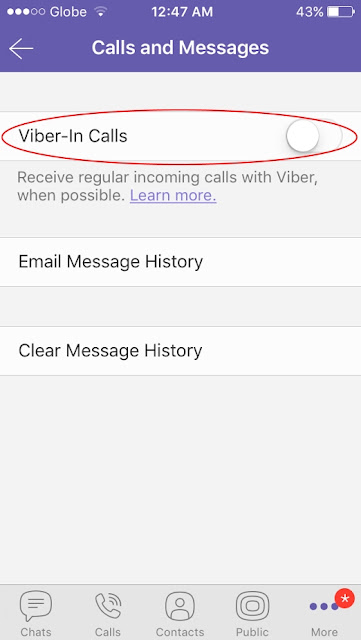
Turn This Off On Your Viber To Avoid Roaming Charges

Image
When traveling and you want to avoid bill shock from roaming charges, you can use Viber for calls, especially when there's wifi (say, in a hotel). Just don't forget to turn off "Viber-In Calls" on your settings. If you keep this on, your Viber calls could be diverted to regular roaming calls, with roaming charges.

How to Upload Photos to Blogger Using Windows 10

A quick google will show it's a common issue. I upgraded my desktop to Windows 10. Works great! Except for uploading photos to your blog on Blogger (like this one). When you click on the "insert image" icon, a window pops up that makes you choose whether you'd like to upload from your computer or from a URL link. Unfortunately, this window just freezes whatever you do. You will have to close the Blogger tab.  I use Windows Edge but I read this is the same issue regardless of browser. I found a way to do it, not elegant, but it works. Here are the steps: 1. Upload your photo/s to a photo hosting site. I use Photobucket. 2. Start your post on Blogger. When you want to insert an image, DON"T CLICK ON THE ICON! 3. Instead, go to your photo hosting site (Photobucket) and copy the HTML link to your photo. It's the one that starts with the symbol "<" followed by "a href=" 4. Paste the link into your post. 5. Repeat steps 3 and 4 f...

iOS 8.3 upgrade for iPhone 5: improved battery life!

It's been a week since I upgraded my iPhone 5 to iOS 8.3. I was hesitant at first due to mixed reviews. The consensus seems to have been "wait and see", specially with iOS 8.4 around the corner. But I've been experiencing poor battery life since iOS 7 to iOS 8.2, always having to recharge by midday. So I thought I had little to lose -- most of the issues on iOS 8.3 were related to touchID which the iPhone 5 doesn't have. I'm glad I upgraded. Battery life has been a vast improvement, I'm back to one charge cycle per 24 hours. My guess is the better management of apps in the background. Good job, Apple!

Auto Lighting Optimizer and Highlight Tone Priority - Test on Canon 550D and 17-40 F/4L

Image
Canon DLSRs of recent years have in-camera features that are supposed to extend Dynamic Range. One feature - Highlight Tone Priority (HTP) - aims to retain details and prevent clipping of highlights (bright areas). Another feature - Auto Lighting Optimizer (ALO) - aims to lift details from shadows (darker areas). ALO is deemed useful for high contrast scenes, eg, backlit subjects; HTP is deemed useful for high-key shots. Both are used on jpegs. For the Canon 550D, HTP is enabled or disabled within the menu (Cn Fn 6), while ALO has four settings (Off, Low, Standard, Strong). ALO is disabled if HTP is turned on. I did a few test shots using the EF 17-40 mm F4/L lens. The images below were taken a few seconds of each other and have not been edited except for resizing. Aperture f/5.6 and shutter speed at 640 and ISO 100, except for the image with HTP on at shutter speed of 1250 and ISO 200. The effects of HTP and ALO are not s...

Wimbledon Effect in Golf?

There are many versions of the "Wimbledon Effect", but a simple one is about weekend tennis players playing better after watching Wimbledon on TV. I watched The Masters at Augusta on TV last night. Some observations: the players don't swing out of their boots -- they swing smooth and not jerky and it doesn't seem forced. I also noticed that their arms seemed relaxed and not stiff. So this morning I tried to swing like the pros. No need to go for that extra ten yards, swing smooth, go for accuracy. On chips, pitches and putts tried to keep arms relaxed and grip firm but not tight. The result -- I scored my best game from the blue tees on my home course so far. Definitely the Masters Effect. Hope it is not temporary, like the temporary bump in club membership applications after every Wimbledon.

Resolving Mac OS X Leopard Compatibility with Linksys Router

Recently changed my wifi router from a TP-Link to a Linksys E1200. All my mobile devices linked to it immediately with no problem. All desktops on Windows and laptops on Windows and Mac OS had no problems -- except an old Macbook with Mac OS 10.5.8 (Leopard). Browsing was glacial, if not, frozen. Tried changing DNS settings to no avail. Whether Safari or Google Chrome, the web pages won’t load and the browser just hung. Finally found the solution. Under System Preferences > Network, click on the TCP/IP tab. Then set “Configure IPv6” to “Off”. Voila! Now the Mac is surfing!

94 Again

OK, maybe my game is really good enough for the 90's. To get to score in the 80's I need to go to the next level. For starters a longer drive, and more length overall. More work at the driving range. I need to keep building both my long and short games. In the meantime, the foundation needs to be a consistent iron game (including hybrids). Here are excerpts of really useful tips from David Leadbetter's "100% Golf." Approach Play - 170 yards and in, the strike zone. "Watch most tour players and you will find that they hit these shots with a compact, almost three-quarter action. They swing within themselves." "The irons are direction clubs, not distance clubs." "Keep your feet flat on the ground as much as possible.... That will give you a real sense of stability in the lower body providing the base for a good upper body turn and a controlled arm swing." "Look for the hands to swing to about 11 o'clock on the backswing through...

DIY Yoghurt Snack

I like White Hat, Red Mango, Fru Yo, Lulu Belle - all of them! My favorite toppings are granola and almond. But I sometimes concoct my own version at home. I start with BTIC (Better Than Ice Cream) Frozen Yoghurt, Cookies & Cream flavor -- thaw for about 10 minutes, and get two (or more!) scoops. Add a tablespoon of crushed Kellog's Raisin Bran for texture and body, and a teaspoon of Coco Pops for that crunchy surprise. Sprinkle half a Choc Nut for mouthfeel and nutty flavor. Simple pleasure!

Detailing 101

Image
Found a simple and effective way to maintain the paint of my new white car. Since it is brand new, the first "treatment" was - a washing with Microtex Car Wash - waxing with Pure Carnauba Wax (Mothers) - topping up with (Mothers) FX Spraywax. Microtex Wash cleans grime without polishing (or removing any previously applied wax). Carnauba Wax provides protection (it lasts longer than synthetic polymers). The Spraywax (I think this is silicone-based) enhances the sheen of the Carnauba wax and adds another protective layer. For subsequent maintenance, this is the routine 1. Weekly car wash with Microtex, then FX Spraywax after each wash 2. Every 4-6 weeks clean and wax with Carnauba Cleaner Wax (Mothers, Meguiars, or Turtle Wax), and FX Spraywax after waxing 3. Every 4-6 months a (Mothers) Clay bar treatment. See the sheen!

Nokia E75

Image
Been using this smartphone for about a week now. It's really good and deserves the positive reviews it has received. I like it much better than my Nokia N95. It is sleeker and has much better build quality. The sliding querty keyboard comes in really handy when you are typing long text messages. It also starts and runs faster, unlike the N95 that seems to take forever to launch applications and programs. Plus, it's got push email capability. To help protect the screen I looked for a screen protector in some of the cellphone shops in the malls but looks like there is none yet for this new model. So I checked if the solution I used for the viewfinder of my Canon DSLR would work. Well, it does. I was thinking of a temporary fix but maybe it's for keeps (see pics above). It's simple really, just use a packing tape like the one below to cover the screen, then use a blade or a cutter to cut the edges -- voila!

Camera Sensor Cleaner

Image
I've been using a Canon EOS 10D for the last five years. It's a dinosaur by tech standards but still takes good pictures as the day I got them. The build quality is top notch. Aside from megapixel count, it does lack some of the features of the newer models, including the image sensor "cleaning". But there is a way, and the one I found seems to work well. Here are the basic starting materials. They are a wooden spatula (given out with some ice cream cups) and an anti-static wipe such as Dust Off (Pledge Wipes also work). Cut the wide end of the wooden spatula with a knife to have a straight beveled edge. Cut a 3 inch square piece of the wipe. Wrap the wipe around the spatula end. Wipe the sensor gently but with single strokes. Disclaimer: It works for me, but your mileage may vary. I am not responsible for any damage caused to your equipment from using my method.

Fix for PLDT myDSL DNS Problem

It looks like the (selective browsing) problem with PLDT myDSL happens when you set your DNS to automatic. There's a couple of solutions: 1. Set the DNS manually at the TCP/IP Connection setting. Here are some of PLDT's DNS servers: 58.69.254.3 58.69.254.4 58.69.254.8 58.69.254.9 58.69.254.43 58.69.254.46 58.69.254.70 58.69.254.72 58.69.254.103 58.69.254.104 58.69.254.106 58.69.254.133 58.69.254.134 58,69.254.135 58.69.254.137 202.57.96.4 203.87.128.3 203.172.11.21 203.172.11.25 203.172.11.26 2. Use Opendns servers: simply use the ff in the DNS setting 208.67.222.222 208.67.220.220 Just be aware that there have been reported cases of Opendns blocking some google pages. I used the first PLDT DNS server listed above and it has solved my problem completely. I also noticed webpages loading faster than before. Hope this fix is going to hold up. 3. Update >>> You can now use Google DNS 8.8.8.8 8.8.4.4 Hope this helps.